Disposable Shiny Apps
This post is based on my posit::conf(2025) talk of the same name. The talk’s companion repo is on GitHub. Credit to Barrett Schloerke, whose talk on single-file Shiny apps planted the seed for this one.
I build Shiny apps. A lot of them. I maintain a two-year-old app with a hundred-plus users. It has tests, CI/CD, and a backlog. I know the pain of longevity. But I also build apps for single meetings. They live for an hour and die gracefully.
This post is about the second kind.
The moment everything stalls
You know the scene. You’ve crafted your narrative. You’ve polished the slides. You tell the story. And then a stakeholder asks:
“That’s interesting, but what if we looked at the data this way?”
Your answer: “I’ll have to get back to you on that.”
The conversation stops. You had their attention and you couldn’t keep it, because a static slide deck can’t bend to the question.
Two traps
We don’t build more apps because we fall into one of two traps.
Trap 1: “Don’t Build.” It’s too much effort for just one meeting. The development hill looks too steep, so we default to slides.
Trap 2: “Over-Build.” If I build it, it must be production-grade. We over-engineer a complex solution for a simple, one-off need.
The consequence of both traps is the same: death by PowerPoint.
A third option
What if building an app for a single meeting was as easy as making a slide deck? That’s the disposable app.
A disposable app:
- Gets its value from immediate impact, not longevity
- Is a communication artifact, not a production system
- Is designed to be thrown away
Think of it as a whiteboard sketch, not a monument. Valuable in the moment, erasable afterward.
How to build one
The development hill isn’t steep anymore. With AI-assisted coding, you can go from a question to a working Shiny app in about fifteen minutes.
Step 1: Start with one question
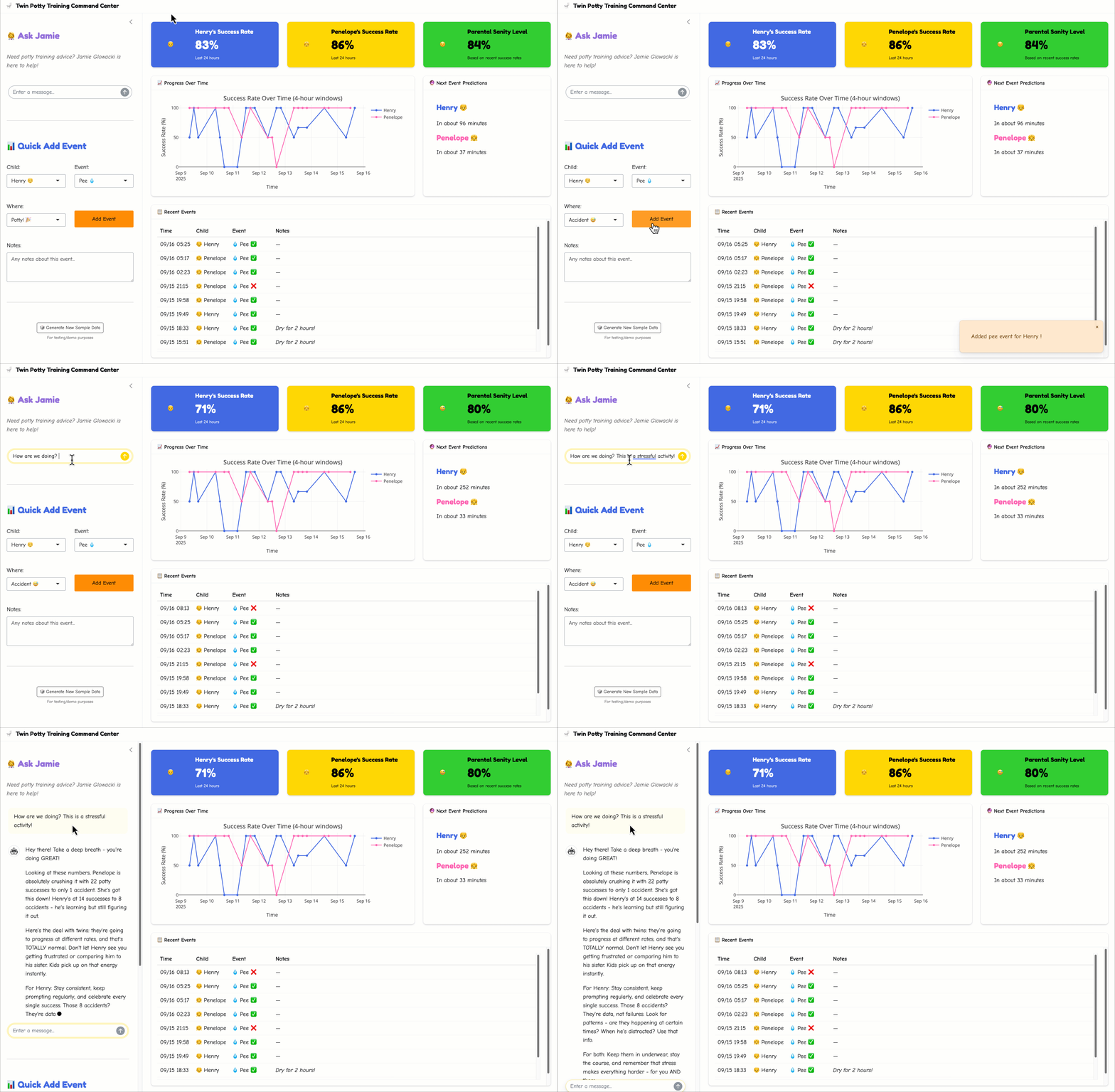
A disposable app should do one thing well. Don’t scope a dashboard — scope a question. For my talk, I used a question from my own house: twin toddlers in potty training, a four-year-old, four cats, and general chaos.
The question: How can I track and optimize twin potty training success?
The stakeholders (frazzled parents) needed real-time insights and encouragement.
Step 2: Write a clear prompt
Describe what you want in plain English. Be specific about features and tools. Here’s the actual prompt I used in Positron Assistant:
@shiny your task is to build a fun and engaging shiny app all about potty training.

- The purpose of the app is to help my wife and me know what to do next
  when it comes to potty training _twins_ (yikes!).
- We are following _Oh Crap! Potty Training_ by Jamie Glowacki.

The app should consist of:
  - a page_sidebar where the left sidebar is a shinychat that we can use
    as our Jamie Glowacki stand-in in times of need. We should use
    `claude-sonnet-4` via ellmer as our guide.
  - a main page with trackers and graphs to track pees, poops, and
    parental sanity. Remember that it matters if we made it to the potty
    or if it was an accident.
  - For bonus points, you can include a prediction for the next "event".
  - You should give this a theme suitable for the task at hand.
    Use `_brand.yml` to help you out.

It is important to remember to treat the twins separately. This should
be easy, they are boy-girl twins named Henry and Penelope.
The key elements: a clear objective, specific features, UI preferences (bslib, sidebar layout), and enough context for the model to make reasonable choices.
Step 3: Let AI generate the code
In minutes, the model creates a complete UI structure with bslib components, realistic data simulation, interactive visualizations, and shinychat integration. You need to watch it work. Not to micromanage, but to keep it on the rails.
Step 4: Tweak and ship
Fix the inevitable broken pieces. Ask for minor layout adjustments. Swap in your actual data. The common time breakdown:
- Generation: 2–5 minutes
- Review: 2–5 minutes
- Tweaks: 5–10 minutes
- Total: about 15 minutes
Ship it and start getting feedback immediately.
Overcoming the objections
“Who will support it?”
Nobody. That’s the point. You don’t need a maintenance crew for a whiteboard drawing. You just erase it. This app took fifteen minutes to build. If we need it again, we’ll build it again, probably better, because now we know more.
“Won’t this create app sprawl?”
Yes, potentially. (Frankly, I might be the wrong person to ask. I’ve been accused of being an app hoarder.) The key distinction: these are communication artifacts, not production systems. You must commit to throwing them away. If an app proves valuable enough to keep, that’s a signal to build a real version with tests, CI/CD, and a maintenance plan. But most won’t need that. Most were valuable for one meeting and one meeting only.
“Isn’t this more work than slides?”
Consider the actual time budget:
A slide deck. Initial creation: 3 hours. Tweaking chart alignment: 2 hours. Handling update requests: 2 hours. “Can you change the colors?”: 1 hour. Total: 8 hours. Impact: low. Interactivity: zero.
A disposable app. Prompt and generation: 15 minutes. Integrating data: 30 minutes. Refine and test: 15 minutes. Total: 1 hour. Impact: high. Interactivity: infinite.
The ratio isn’t close. And fun work goes by faster.
The mindset shift
The tools are here. The only thing left is to change how we think.
| Old mindset | Disposable mindset |
|---|---|
| Perfection | Utility |
| Production-ready | Good enough is perfect |
| Full test coverage | Happy path only |
| Edge case handling | Fast to build |
This isn’t about lowering standards. Production apps should be tested, maintained, and properly engineered. But not every app needs to be a production app. A napkin sketch isn’t a failure of architecture. It’s a different tool for a different job.
The challenge
The next time you have a presentation, I challenge you:
Open Positron before you open PowerPoint.
Ask yourself whether your audience would rather look at your data or play with it. If the answer is play, build a disposable app. It’ll take less time than you think, and the conversation it starts will be worth more than any slide deck.
And when the meeting’s over, delete it.